Showing posts with label TPE. Show all posts

Monday, August 03, 2015

Planning Sunset and Sunrise Landscape Photography with TPE 3.3

Sunrise at Topaz Lake on the California / Nevada Border
Planning landscape photography has traditionally been a process of considering a combination of location and weather.  If you have a general understanding of the geography of a region, you could look at weather forecasts a few days ahead of time and anticipate where and when the best photographic opportunities might present themselves.  During the course of a day you could modify your plan even further, and decide where to be for sunset based on where you see the best cloud formations developing, and where enough breaks in the clouds might let light through.

In recent years the availability of maps and satellite imagery online in programs like +Google Maps made the location planning easier.  The availability of fairly detailed weather forecasts days in advance through the National Weather Service made the choice of where to go in a region a little easier.  Apps like   +The Photographer's Ephemeris added lines to show the direction of the sun and moon at any time of day or night, so you could anticipate the exact sun rise and set time, general sunlight illumination during the "golden hour" before sunset and after sunrise, as well as anticipate the location of the moon.

Forecast for August 2, 2015
The latest version 3.3 of The Photographer's Ephemeris uses the SkyFire service to check weather forecasts to predict sunrise and sunset color, and show a color-coded overlay on a map of the region your're in.  The more red the color, the higher the probability of sunset color,  The mroe blue to clear it is, the lower the probability. You can see the forecast two to four days in advance depending upon what level of service you'e enrolled to receive.

Another handy feature of SkyFire is to compare forecasts for a list of favorite locations that you've saved, so you can decide between locations to drive to, in order to have the best odds of a nice sunset.

I've tested these features a number of times now, and they do well at predicting when there will or won't be sunset color.  Weather forecasting is notoriously imprecise, so of course you can't predict the direction or extent of the color, but so far the correlation between the SkyFire forecast and the outcome is impressive.

Here's the sunset that actually occurred with the forecast shown to the right for August 2:


Multi-day SkyFire forecast on TPE
The multi-day SkyFire forecast format is shown to the right. The bright red box showed a potentially vivid sunrise opportunity at Lake Tahoe.

The SkyFire service is an optional in-app purchase for TPE, with prices as follows:

Top In-App Purchases

  1. Location Synch (1 year)$0.99
  2. Skyfire Plus (3-months)$14.99
  3. Skyfire (3-months)$9.99

There is also a new location synchronization feature, which finally enabled me to sync my iPhone TPE with my Windows TPE.  There was a procedure to do it before that I had not been able to complete.  With this new method it was quick and simple.

If you don't already have TPE, here's a link that you can use to find it in the Apple iStore:

The Photographer's Ephemeris - Crookneck Consulting LLC

Crookneck Consulting also offers a Photo Transit app which enables you to anticipate what focal length you'll need to capture a certain field of view to get the shot that you want:

The Photographer's Transit - Crookneck Consulting LLC

I'm also testing TPE 3.4, so I'll probably have some details on that for you shortly!

Another sunset accurately predicted by SunFire

Saturday, September 06, 2014

Mars, Saturn and Moon Conjunction Over Bodie's 1937 Chevy August 30

Mars, Saturn and the moon over Bodie's 1937 Chevy on August 30
I wrote a blog post last week about the opportunity to capture the moon, Mars and Saturn on the evenings of August 30 and 31.  This is the shot I planned with +The Photographer's Ephemeris to place them over the rusty 1937 Chevy in California's Bodie State Historic Park.

Moments earlier I had been catching sunset on Main Street, and Mars and Saturn were just becoming visible over the DeChambeau Hotel:

Mars and Saturn become visible to the left of the Moon over Main Street in Bodie 


It's fairly easy to plan for interesting photos to capture these astronomical events if you use any one of a number of astronomy or astrophotography planning applications to anticipate potential compositions.  I mentioned several in my blog post last week:
For The Photographer's Ephemeris, check out the new Web version of TPE, since Google has retired the version of Google Maps used in the prior desktop app.

Tuesday, October 08, 2013

Tutorial on Moon Photography Planning

Moon in lunar eclipse, perched on San Francisco's Transamerica Building
Tonight I'll be broadcasting a live tutorial on how to determine exactly where to stand to place the moon on top of a natural or man-made landmark.  Here's a link to the event if you'd like to join us: http://goo.gl/DSXu8Z

In this example, I predicted where to catch the full moon during a lunar eclipse so its path would pass the tip of the Transamerica Building in San Francisco.  Using eclipse predictions, lunar elevation angle and compass direction, I used the height of the tower to predict how far away I'd need to stand and in what compass direction.  I mapped that point on Google Earth, showed up a little early to start shooting hundreds of photos to created the time-lapse sequence, and it turned out that I pretty much nailed it!  The center of the moon passed right across the tip of the tower.

New tools make this sort of planning easier than ever! We'll be demonstrating the PhotoPills app.  If you'd like to purchase the app to follow along on your smartphone as we show the features, follow this link to buy it: https://itunes.apple.com/us/app/photopills/id596026805?mt=8&uo=4&at=10ldnC

Here's a time-lapse video I created of the moon as it approached and passed the Transamerica Building:


This video was featured on Phil Plait's Bad Astronomy blog on Discover Magazine:
http://blogs.discovermagazine.com/badastronomy/2011/12/12/lunar-eclipse-time-lapse/
Lunar eclipse time lapse : Bad Astronomy
Moon Over Half Dome, Yosemite National Park

Update August 2014: Thanks to the +Royal Observatory Greenwich in London for including my moon rise image in your video about the Astronomy Photographer of the Year 2104 competition!

Read my 2012 blog post about my pursuit of this image:
Moon Rise over Half Dome in Yosemite

See my notes below for tutorial blog posts and a copy of the demonstration/tutorial video described in this post.  Here's the Royal Observatory's new video on the Astronomy Photographer of the Year competition:


Here are some of my lunar photography and astronomical alignment examples for you to enjoy:

Moon Rise Between Half Dome and El CapitanEclipse Moon Set Under Belt of VenusMoon Rise Behind Half DomeVane AttemptSunrise Sunspot ViewJoin Me In Yosemite This November
Mono Lake Sunset Moon Rise SaturdaySunset Full Moon Rise over Mono LakeLunar Eclipse, Landing on the Transamerica PyramidMono Lake Sunset DreamFull Moon over Bay BridgeMono Lake Moonrise (Re-edit)
Crescent Moon Setting Behind Auburn CourthouseSolar Rainbow in Yosemite ValleyTree and MoonSouthern California SunsetBorrego Badlands MoonriseYosemite Moonrise
Monitor Pass Sunset Sun RaysMoonrise by Half DomeDawn Full Moon Set in AuburnMorro Rock MoonsetSunset at Pfeiffer RockHappy Thanksgiving!
Moon and Sun, a set on Flickr.

I've been teaching people for years how to pursue lunar photography.  I wrote a blog post back in 2006 on anticipating shots like these: 

     Plan Ahead for Great Full Moon Rise and Set Shots!


That planning got even easier with the creation of apps like +The Photographer's Ephemeris (TPE), as I describe in this 2011 update blog post:
     Put Sunset Full Moon Rise Dates on Your Calendar

These days in addition to +The Photographer's Ephemeris I also use +PhotoPills, StarWalk and Sky Safari+ to plan my shots:
Here's our recorded broadcast of the +Landscape Photography Show, when the developers of the PhotoPills app were kind enough to join me to provide a tutorial demonstration for their software:

http://youtu.be/Wgb_r9JlKRM?list=PLlLN6Bdq3jrnAwmOOhU0TufC9XsjbEiK2


If you find this sort of information valuable, given the new tendency of sites like Google+ and Facebook to filter out the posts of people you haven't specifically interacted with lately, you may want to subscribe to updates to this blog through NetworkedBlogs in the right column.  Since social media networks are getting much less reliable at distributing my shooting opportunity notices, tutorials, workshop announcements, or simply my latest work, people who want to stay in touch may need to connect with me across multiple networks to increase the odds of seeing a post: Facebook, Twitter, Flickr, Tumblr, my blogs, or wherever you're active online.  It's frustrating and a little sad that social networks seem to be stepping back from the opportunity to provide reliable delivery of high quality content to people who want to see it!  

Here are some of the places you can connect with me online:


Tuesday, September 17, 2013

Anticipating Sun and Moon Alignments


Originally posted in 2010, I occasionally bump this forward in my blog to tell people that they can plan to take an amazing sunrise moonset or sunset moonrise shot on an upcoming date.  As I update this on September 17, 3013, here on the California/Nevada border the moon will rise at 5:50 pm tonight and be about 12 degrees up in the eastern sky at 7 pm sunset.  Somewhere with something tall to place the moon next to should work well, like Yosemite Valley.


Tomorrow the moon will rise around 6:25 then be about 5.8 degrees up in the sky at sunset (close to 7 pm).  That will work best somewhere with a relatively low horizon.  These times will vary by your specific location on the globe, and the application described below can correct the times for your position.
I used to line up moon shots the old-fashioned way... looking up the full moon rise, arriving and seeing where the moon was emerging, predicting where it was going, and changing my position several times to try to be in just the right place at just the right time.

Fortunately there's an application that takes a lot of the guesswork out of lining up the sun and moon with natural or man-made objects to take stunning photos. The application The Photographer's Ephemeris allows you to plan a shooting location for a fairly exact alignment with particular landmarks: Free Download for PC or Mac

It runs on Google Earth satellite photos, so you can easily see your planned shooting position, it shows you the azimuth angle (compass direction) of the sun and moon at any give time from there, and you can read the elevation angle as well.  If the lineup isn't just right as the sun or moon is coming over the horizon, you can adjust your shooting position (at various times and stages in the sun or moon rise) to get just the alignment you want.

View the tutorials for some examples of the capabilities of, and applications for, this program.
Tutorials: stephentrainor.com/tools#tutorials  You'll be surprised at just how easy and intuitive it is.

Below are my results from researching on TPE a much more subtle event: anticipating and planning for the position of a crescent moon. I identified two positions a couple of blocks apart for two different times, then adjusted my position a few yards onsite to place the moon beside or behind the same courthouse, while avoiding trees or power lines.

So fire up TPE and go give this a try in your area on the next full moon rise (and set), or whenever!  Let me know how it goes.

 Remember to pick a target reasonably far away (say 1/2 mile to several miles) to put the moon alongside, so you can use a long zoom lens and capture the moon appearing really large beside it.


Thursday, December 09, 2010

Put Sunset Full Moon Rise Dates on your Calendar

Moon rise during sunset at Mono Lake.  The blue color near the horizon is the shadow of the earth.
Mono Lake Sunset Dream, originally uploaded by Jeff Sullivan (MyPhotoGuides.com).
Most of the time the full moon is too bright for you to take a landscape photo and preserve detail on the moon. However, there's one situation where the moon can be bright, crisp and full, yet you can include it in a landscape photo: when it rises around sunset and when it sets around sunrise.

Each month the full moon rises around sunset and sets around sunrise, and generally speaking, its rise and set times change an hour or so for each day you get away from the full moon day. So to catch the full moon in the sky while it's still daylight, look at the sun and moon times for the day before the full moon. Consider landscape shots where you can shoot eastward towards the rising moon. You can even look up the exact moonrise angle on a satellite photo of the site you're considering on Google Earth using a program (free for your laptop/desktop PC, small fee for iPhone) called The Photographer's Ephemeris (TPE), and plan exactly where to place your tripod so you'll get the moon lined up exactly how you want it vs. natural or man-made objects between you and the horizon.

Moon rise 6:59 pm (light blue line shows direction), shortly before 7:14 pm sun set (orange line shows direction).


To catch the full moon in a generally westward direction, the same process applies, but look one day after the full moon and check for the moon setting just before sunrise.

The sun moves quite a bit from summer to winter, so to go even further and select destinations when the lineups work best, you'll be able to note on +The Photographer's Ephemeris what the bearing (compass direction) is from your favorite viewpoints to landmarks in the distance, and you can plan on being there when the moon will be in exactly the right place.

All of the times and angles vary somewhat as you move across your region, so simply to give myself a ballpark idea of how the sunset moon rises work out for 2011, I picked Modesto more or less in the middle of California:

Times for Modesto, CA:
................ Sunset... Moonrise... Bearing
Dec 20... 5:13....... 4:23.......... 59.2
Jan 19... 5:12....... 5:26.......... 68.2
Feb 18... 6:48....... 6:41.......... 86.2
Mar 18... 7:12....... 6:26.......... 89.9
Apr 17... 7:40....... 7:43.......... 108.7
May16... 8:06....... 7:45.......... 116.6
Jun 15... 8:25....... 8:37.......... 119.6
Jul 14... 8:24....... 8:03.......... 115
Aug 13... 7:58....... 7:44.......... 101.5
Sep 12... 7:15....... 7:09.......... 85.5
Oct 11... 6:31....... 6:07.......... 76.1
Oct 12... 6:30....... 6:37.......... 71.2
Nov 10... 4:56....... 4:48.......... 64.7
Dec 9... 4:44....... 4:12.......... 61.4

Now I can plan where I'll be for each sunset moon rise, and look up the more accurate numbers for sunset and moon rise in those exact locations... and now you can too!

The same process can be used to place and shoot crescent moons, which are attractive because they also rise and set near sunset/sunrise, and the thinner crescent moon phases don't put reflect so much sunlight that they'll interfere with your night shots.

Examples of landscape shots including the sun and moon, some planned in advance using TPE, may be found in the Moon and Sun set on my Flickr photostream.

Maybe you won't be inclined to go to as much trouble as I do to plan your shots, but nevertheless, if you plan on getting out on these dates to shoot around sunset, you could have the added bonus of a full (and not overexposed) moon to include in the shot!

Tuesday, July 06, 2010

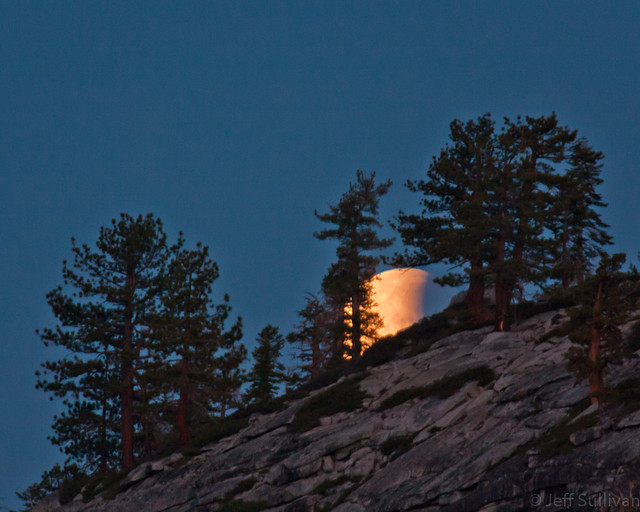
Lunar Eclipse Moonset from Olmsted Point

Lunar Eclipse Moonset by Olmsted Point
Using the free program The Photographer's Ephemeris to predict the path of the moon during the lunar eclipse as starting over Half Dome and ending a few degrees to the North on the horizon, I set my camera up to capture a timelapse sequence of the event. It will take a significant amount of time and effort to produce the video, but I did take a couple of shots around sunrise that I can share.

Wednesday, November 01, 2006

How To Plan for Great Full Moon Rise and Set Shots!


As a general rule of thumb the full moon rises at sunset and sets at sunrise. This is very convenient because you can get the moon illuminated by the orange glow of the sun, with its color and size magnified by the atmosphere, low enough to place it near some of your favorite subjects on the ground (such as reflected in your favorite lake or fountain). Turn in any other direction, and you also have the sunrise/sunset itself to shoot, as well as subjects side-lit by the warm, low-angled light!

In practice however the actual moon set and rise times, and how they relate to sunset and sunrise, will depend upon the time of year, your position on the earth, and your position towards the east or west side of your time zone. Fortunately you can simply look up the time for your town. I'll get to that in a moment.

First I'd like to point out that you often don't want to shoot on the exact full moon date. The moon's brightness can be too great unless the sun is still lighting the ground with enough intensity. Fortunately the moon rise and set times move a little later each day, so a day or two before the "official" full moon it will be rising while the foreground is still lit, or if you have mountains on the horizon it will be high enough to clear than the horizon while the sun sets. Similarly, the day or two after "full moon" is often best for dawn moon set shots, since after the full moon date it remains in the sky above the horizon as the sun rises and lights the scene.

For example, in November where I live the sun is rising around 7am and setting around 4:46 (it changes a minute or so each day), so the November 24 moon rise at 4:24pm should be lit by the setting sun. Also that morning's moon set at 7:15am will be right after the rising sun has started to light up the landscape around 7am.

In the past I used the U.S. Naval Observatory to produce charts of sun and moon rise and set times.  Here are examples of the rise and set times (in 24 hour military time) for October, November and December, with the link you can use to look up times for your location (assuming no mountains on your horizon of course):

http://aa.usno.navy.mil/

SACRAMENTO, CALIFORNIA
Rise and Set for the Moon for 2007
Pacific Standard Time

Oct..........Nov..........Dec......
Rise Set Rise Set Rise Set
h m h m h m h m h m h m
24 1615 0432 1642 0719 1738 0818
25 1645 0550 1742 0835 1853 0906
26 1721 0710 1851 0941 2005 0943
27 1806 0831 2004 1034 2114 1014
28 1900 0949 2117 1115 2219 1039

If you have a calendar in your cell phone or PDA you can program rise and set times in, even months ahead of time, and don't forget to add an alarm 45 to 60 minutes ahead of time to remind you to get to the site 30-45 minutes early to plan and set up for your shots.

Vane AttemptToday I mainly use a free app on my PC, "The Photographer's Ephemeris" (TPE) to plan for the moon position in more detail on a +Google Earth satellite image:

Anticipating Sun and Moon Alignments

http://activesole.blogspot.com/2010/03/anticipating-sun-and-moon-position.html

Using TPE you can check the moon's altitude in the sky at any moment, so with a little extra math to check the geometry, you can set up your camera in advance to line the moon up with just about any land-based object.

As an example, here's the moon during a lunar eclipse, which I planned to capture as it passed right through the tip of the Transamerica Building in San Francisco.  Since I was shooting images to create a time-lapse video, I had to put the tripod in the exact right place at least 15 - 20 minutes ahead of time:


It's amazing the tools photographers have at their fingertips these days!

Shooting tips:

Set your camera on manual focus and focus it a little behind the closest object you want in focus (depth of field only comes a short way forward, longer towards the distance). Use a small aperture if you have a tripod and are taking a wide shot, but if the exposure gets long and your zoomed in on something, remember that the moon is constantly moving and it will blur, so consider widening to f/8 or more (best to bracket f-stop settings and get the shot than to wish the next day that you had done something different).

The lighting will change rapidly in the course of a few minutes, so bracket your exposures ligher and darker, and consider using your camera's exposure compensation to darken most shots (you can combine it with automated exposure bracketing in many cameras) so the moon won't be a blurry, washed out mess. Plan ahead to have a foreground subject, a scene that the moon and possibly sunrise/sunset simply adds another dimension to (the moon itself has been done once or twice before). If the exposure range is too great between the bright moon and your darker foreground subjects, you can expose differently for the two and combine the shots later. You used to have to spend a lot of time in Photoshop to combine differently exposed shots, but now specialized "HDR" software will do the work for you automatically (best to use 2 or 3 exposures AT LEAST 1.5 to 2 stops apart in exposure from each other). See my experience tip on HDR and download trial Photomatix software at HRDsoft.com, but you can do that later as long as you bracket shots and use a steady tripod (and best to use automated exposure bracketing) so multiple exposures will line up and can be automatically processed.  Search this blog for "HDR" for more information on the technique.  If you decide to buy Photomatix, you can get a 15% discount by using the coupon code JeffSullivan when you by it from its publisher HDRsoft: http://www.hdrsoft.com/order.php

Consider trying some shots using fill flash if your foreground subject is within the appropriate range (about 8-20 feet for most cameras). Dawn and dusk are also prime times for using graduated neutral density filters to darken the bright sky and bring out what's on the ground, enabling the camera to see what our eyes can see onsite.

If you'll be travelling during the prime full moon days, the equator is 25,000 miles in diameter and completes a revolution in 24 hours, so it's moving at over 1000 miles/hour, so a rough estimate would be that every 100 miles you move east will be a 6 minute earlier change to the rise and set times, and 100 miles west will be 6 minutes later... more or less.

You don't want to fumble around in the dark, so don't forget your tripod, flashlight, jacket, hat and gloves, bug repellent in the summer, and maybe a folding chair for long moonlit night or star trail shots.

Now go look up the moon rise and set times for your area, and plan ahead to go nail some great shots in the 3-5 great shooting days that the moon gives us each month!