Showing posts with label stars. Show all posts

Saturday, May 02, 2015

Time-lapse of the Milky Way Rising in the Mojave Desert

In late April I was out camping in the desert, and I set an alarm to get up in the early morning hours to catch the Milky Way rise.  Around 1 am the first bits of it were just rising over the eastern horizon, so I set up two cameras, to catch both static and panning views of it.

The camera on a stationary tripod captured images that I could also process to create star trails images:

See the link to my star trails tutorial below
 Here's the time-lapse video captured on a second camera, using a sky-tracking, panning mount:


Digital Rights Management by Nimia

 Here's the time-lapse video captured on the stationary camera:


Digital Rights Management by Nimia

I set another alarm to wake up near sunrise to stop the time-lapses, and with one of the cameras I captured multiple shots to stitch together a panorama of the Milky Way, now forming a high arc in the sky.

Milky Way Over Joshua Trees, Panorama
It all turned out really well.  I should sleep at work more often!

Here's some introductory information on night photography techniques, in case you want to try yourself:
How to Capture Milky Way Images

Create Star Trails Images


I can show you more advanced techniques as well as these in more detail during night photography workshops in the "ghost town" of Bodie. We have five workshops scheduled in 2015, with dates available from May through October.  Several of the workshops also offer special escorted access into building interiors, which are not generally open to the public:
http://www.jeffsullivanphotography.com/blog/bodie-night-photography-workshops/


P.S. - Thanks in advance for lies, shares, +1s, comments, or any other honors that you choose to bestow on my blog posts!  With my book done, I'm trying to get a lot more active on updates to my blog, so you should see a lot more activity and updates here in the coming weeks and months.  I also have a "new"(er) blog, which I use to consolidate social media posts to: www.JeffSullivanPhotography.com.

Tuesday, October 28, 2014

Orionid Meteor Shower Peaks October 21-22!

Orionid Meteor Shower Peaks October 20/21!
An Orionid meteor next to the constellation Orion

The annual Orionid meteor shower is created when Earth passes through trails of comet debris left in space long ago by Halley's Comet as it orbits around the sun. The meteors, or "shooting stars", develop when pieces of rock typically no larger than a pea, and mostly the size of a grain of sand, vaporize in Earth's upper atmosphere.

This is a composite shot of the best meteors that I caught during the Orionid meteor shower in 2014 over the course of several hours in Central Nevada:

Orionid Meteor Shower 2014
I used a star-tracking mount to follow Orion and produce that composite, so when I created a time-lapse from the same footage, it turned out like this:


For a perspective fixed on the ground with the sky moving, here's a time-lapse video from chasing the Orionid meteor shower in 2012 in the Mono Basin in the Eastern Sierra:


In 2014 Liz Horton at +ABC11-WTVD in Raleigh for using this Orionid Meteor shower time-lapse video to inform viewers about the Orionid meteor shower.  Here's ABC11's report informing viewers of the upcoming shower: http://abc11.com/weather/orionid-meteor-shower-visible-tuesday-night-/359788/

My 2015 Orionids photo featuring Venus, Jupiter and Mars has done well  on +Twitter so far:

Where will you pursue this year's Orionids?  In 2015, I suspect that the morning of the 23rd could be good after the moon sets.

Thursday, August 15, 2013

Perseid Meteor Shower 2013

Perseid Meteor Shower August 2013:

Don't watch in this tiny window though... start it, then click "watch on YouTube" at the bottom, then the little gear icon to make it go 1080p or 720p HD, then click on the icon to make it go full screen.  Enjoy!

I have a copy on Vimeo as well in case you might like to compare the two:


Perseid Meteor Shower 2013 from Jeff Sullivan on Vimeo.

Watch this in 720P or 1080P HD resolution. Over six minutes of footage from recent nights in 2013 during the Perseid Meteor Shower. The slower, mostly horizontal lights are airplanes. The brief flashes of mostly vertical streaks are the meteors (a few slower ones are satellites). Many meteors are faint, so you'll only see most of them if you follow the instructions above and change the viewing resolution to HD and expand the video full screen.
For the soundtrack, the timelapse video of the Perseid meteor shower is set to the InFiction String Remix of David Bowie's "Let's Dance", as featured in the recent Kia commercial (used with permission).

All images © 2013 Jeff Sullivan. To license Perseid meteor shower or other time-lapse footage, please contact me. All unauthorized uses will be pursued.

Friday, August 05, 2011

Perseid Meteor Showers in August


It's that time of the year again! The annual Perseid Meteor Shower is underway. This year the peak nights of the shower will coincide with a full moon. This will obscure all but the brightest meteors, but there are still some decent opportunities for photography. Try early morning hours over the next few nights, after the moon has set. Even when the moon is in the sky you can shoot North-facing shots to face away from the moon and capture the brightest meteors, as well as star trails around the North Star, Polaris.

The meteors will appear to come from the radiant constellation Perseus, not far from Cassiopeia (a giant W you can spot more or less opposite the North Star from the Big Dipper). Get out someplace dark and clear, and enjoy the show! Best viewing hours are 11pm - 4:30am as the Eastern half of your sky rotates around to the leading side of the earth as we hurtle through space at 69,360 MPH around the sun (574,585 MPH relative to the Milky Way, another 1,339,200 MPH relative to other galaxies).

The moon sets at 11:30pm tonight, then roughly another hour later each night, so get outside in the early morning hours and watch the show, and capture star shots while the stars remain bright in the moonless sky.

Read down a few posts on my blog to see tips on capturing Milky Way or star trails photos. To maximize your odds of capturing some bright meteors, simply trigger your exposures as fast as your camera will go. I use an external "intervalometer" timer/trigger to start the next exposure one second after the previous one. By capturing dozens or hundreds of exposures in a row, you can capture many meteors over the course of many minutes or hours.

The photo at the top of this blog entry is a link to a whole album of Perseid Meteor Shower photos from past years. Go check them out for some inspiration or ideas!

Wednesday, May 25, 2011

How to Take Milky Way Photos

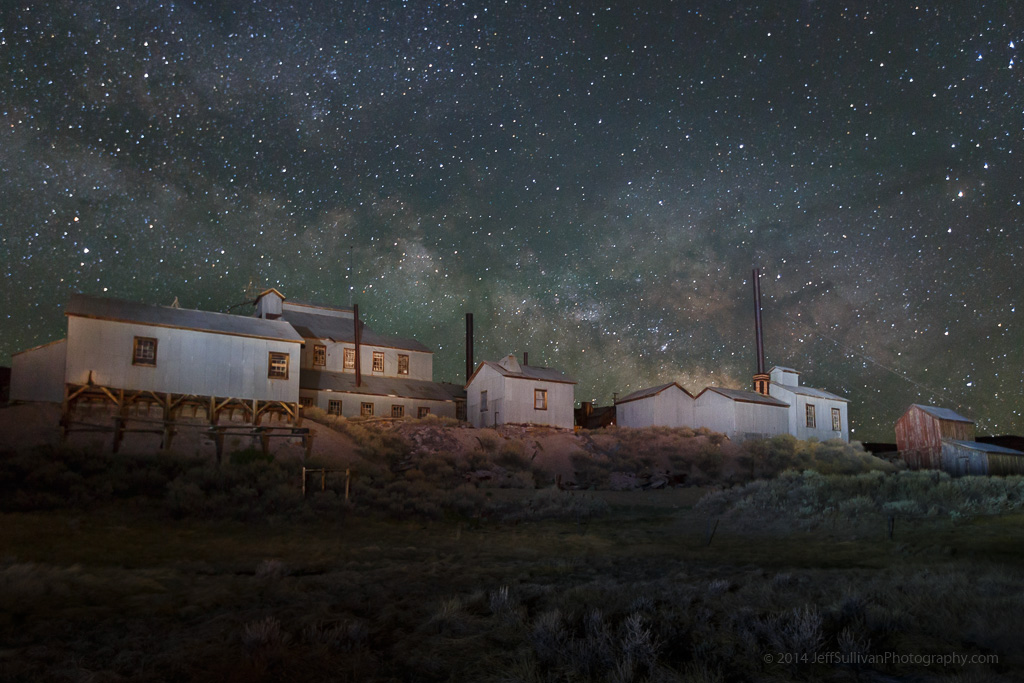
Bodie's Standard Mill
Milky Way over Bodie's Standard Mill
Many digital cameras these days can do surprisingly well at capturing images at night. Their sensors are more sensitive than your eyes, especially at capturing color at night.

Photography has always involved multiple steps, with exposure being only one part of the equation. In the days of film, the darkroom enabled additional influence to be applied during development, and then again during printing. Unless you were using a Polaroid camera, there was no such thing as "straight out of the camera." Maybe you trusted someone in a drug store to do your developing and printing for you, but that wasn't an optimal situation and that certainly doesn't mean that no adjustments were made. For the most part, the entire concept of "straight out of the camera" is a myth that is best set aside as soon and as thoroughly as possible.
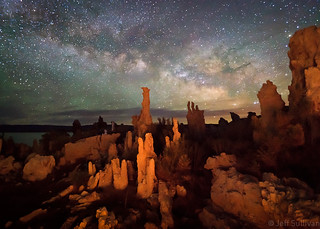
Out of this World
Milky Way over Mono Lake tufa formations
Today with digital cameras your darkroom is on a computer, implemented in software. Milky Way shots are a great example of images that you won't get the most out of until you get in the habit of spending 5 minutes in your digital darkroom to complete the photographic process.

If you find a dark place outdoors to shoot and you can make out stars and the lighter, more dense band of the Milky Way, a little postprocessing can get you a lot further. As with my previous blog post you need to shoot on a tripod, using manual aperture and manual focus. Having your long exposure noise reduction turned off is not critical since we're dealing with single exposures for Milky Way shots.

Alien Terrain (vertical) Shoot with your widest focal length lens to minimize star movement in the field of view, have it opened to its widest aperture to minimize exposure time. You may still have little enough light that you shoot at the longest exposure time (generally 30 seconds) or you may need to shoot in "bulb" mode for a longer time in order to get enough light. Always shoot in RAW mode so you have far more adjustment capability in post-processing software.

Shoot near the date of a new moon, so there is as little light pollution as possible. The last thing you need to know, probably the most important thing during planning your shot, is how to predict when the most intricate, dense, bright center of the Milky Way is in the night sky! In Summer the sun is up roughly 2/3 of every day, but the Milky Way crosses the sky in the night. The center of the Milky Way is towards the constellation Sagittarius. You can look up the dates when Sagittarius is high in the sky, and that's when the Milky Way is most intense: http://homepage.ntlworld.com/mjpowell/Astro/Sgr/Find-Sagittarius.htm

In simple terms, it highest around midnight around July 22, two hours later per month earlier (2am in May), two hours earlier per month later (10pm in August). So really your best shooting will be on days near the new moon dates, and preferably within 7 weeks or so of July 22.

So lets assume you go out on the right night, shoot south towards Sagittarius, capture a RAW file with some stars showing, and maybe you can barely make out the bright stripe of the Milky Way and its slightly more dense center.

Well, if you were in a darkroom... how do you lighten the Milky Way while keeping the background sky dark? The simple answer is dodge and burn... selectively darken some areas while lightening others!

Southern California Night Sky In +Adobe Photoshop Lightroom (download a 30 day trial if you don't have it already, AFTER you collect some images to process) use the paintbrush tool (under the Develop module) to select and lighten the area around the Milky Way. Use the paintbrush tool to darken the sky everywhere else (this makes both the Milky Way and the stars pop).

To do even better, you can also increase contrast while performing these functions, further darkening background light levels, including noise. Adjust exposure and brightness so the fainter stars in the Milky Way get brighter while background and noise gets dark. You can increase saturation slightly on the Milky Way, but increasing contrast has that effect already, so you might not need to.

Rocket Trail
NASA satellite launch over the California Coast
Don't worry too much about how much noise your camera produces... after you adjust contrast and brightness, just crank up the noise reduction. After all, there isn't generally much detail to lose by doing that. In Lightroom for dark, noisy photos I try to max out noise reduction at 25 or maybe 30, but lately for night skies I've been going into the 60s.

Lightroom can also selectively adjust saturation and brightness of individual colors. If you shoot too close to sunset and "blue hour", or during a too-bright moon that is too full (and creating blue night sky), it can be handy to darken a blueish background sky to help separate that from the stars (just did that on a star trails shot). On the other hand for dark new moon skies, like you should have if you're planning ahead for Milky Way shooting, there is little or no light scattering turning the sky blue. A lot of the Milky Way stars have a slight blue tint though, so selectively raising brightness of blue can help separate them from dark background and any noise.
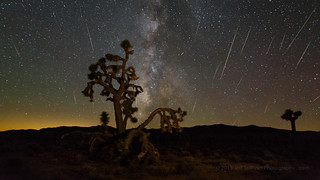
Perseid Meteor Shower 2015
Perseid meteor shower in the Mojave Desert
It's a balancing act between white balance, adjusting individual colors, and tweaking the brightness and especially contrast of the area the Milky Way covers, but you can find a reasonable compromise pretty quickly. Once you do fairly well adjusting one shot, Lightroom enables you to copy your develop settings and apply them to additional photos.

There are other subtle considerations of course, especially for special situations such as meteor showers, but this will get you off to a great start!

---

Milky Way Arch Over Standard Mill
Milky Way arch panorama
If you'd like a little extra help, I lead one night photography workshops in the Wild West "ghost town" of Bodie.  For more practice, you can join me for a longer tour of Yosemite, Death Valley or the Eastern Sierra.

In many cases I offer a visit to Bodie adjacent to one of those longer workshops, so you can shoot in Bodie to start or end your trip.

If you're looking for dark places to try night photography on your own, consider anywhere away from metropolitan areas. I identify over 300 great locations for landscape photography in my new 320-page book, "Photographing California Vol. 2 - South", pictured below.

For night photography in California, focus on locations in the Southern California desert from Anza-Borrego State Park through Joshua Tree National Park and Mojave Preserve to Death Valley National Park, or on the Eastern Sierra region.

I offer author-signed copies on my Web site: www.JeffSullivanPhotography.com

Wednesday, December 29, 2010

Meteor and Milky Way over the Sierra Nevada

A single image from a several hour, 438 frame timelapse I'm working on, taken while backpacking last Summer.

Flickr isn't accepting the HD video files I've been trying to upload this week. Vimeo.com only lets me upload one high definition file per week (I don't have a revenue stream for video to justify upgrading to unlimited), so I'm not sure when I'll a high resolution copy available. In the meantime however, you can see Vimeo's severely downgraded preview:

Sierra Nevada Milky Way Timelapse from Jeff Sullivan on Vimeo.


If this embedded player doesn't seem to play it well, try viewing it directly over on Vimeo: http://vimeo.com/18260497. For low resolution previews that Vimeo downconverts from HD, I don't recommend full screen viewing.

It looks a lot better on my laptop of course, where it actually runs slower and you can see more details such as the meteor, a satellite, and so on, so I may slow down the frame rate on the next version of this that I create.


If you like my coverage of places and events, send me around the world to capture more images and timelapse videos for you to enjoy! Blog Your Way Around The World -
http://www.blogyourwayaroundtheworld.com/blogs/view/1238 The voting deadline is December 31.